![CVG_Sheild.png]](https://support.columbiavehicles.com/hs-fs/hubfs/CVG_Sheild.png?height=40&name=CVG_Sheild.png)
First, you will need the customer's order number or the PO number.
Enter the order number into CUSORD.
Check the status field in the order details tab
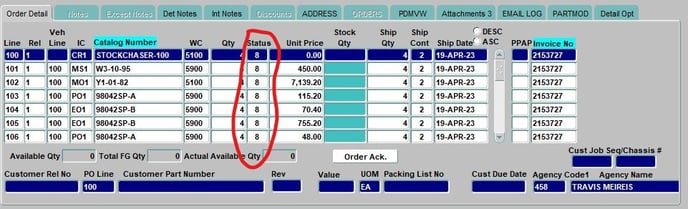
The number will tell you what the order status is and the chart below will tell you what that means.
Status Chart
0 |
NOT REAL, sales hold |
00 |
Ship hold, credit hold |
3 |
Customer service change |
5 |
Good in P&A screen |
6 |
Printed, will be picked shortly |
7 |
Has been picked and shipped |
8 |
Invoiced |